8 Products for Caloocan Wholesale Buyers to Evaluate First
The product URLs below are preserved for direct specification review. Images are displayed in full proportion so buyers can assess form factor before requesting a quotation.
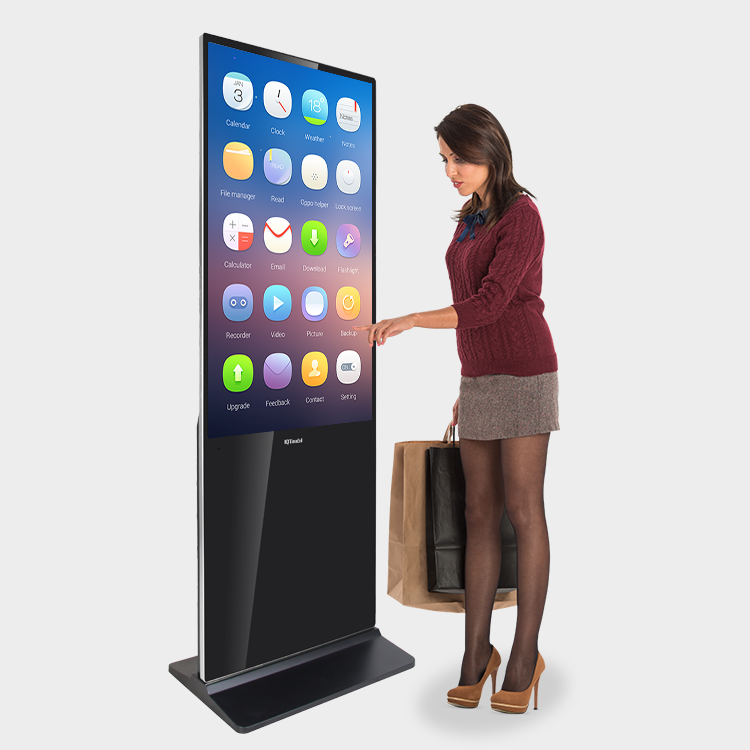
43inch Kiosk Touch Screen Floor Standing Advertising Kiosk Shopping Centre Digital Signage and Displays Outdoor Waterproof
For Caloocan retail frontages, mall corridors, transport-adjacent lobbies and LGU information points that need a weather-resistant, high-visibility display.
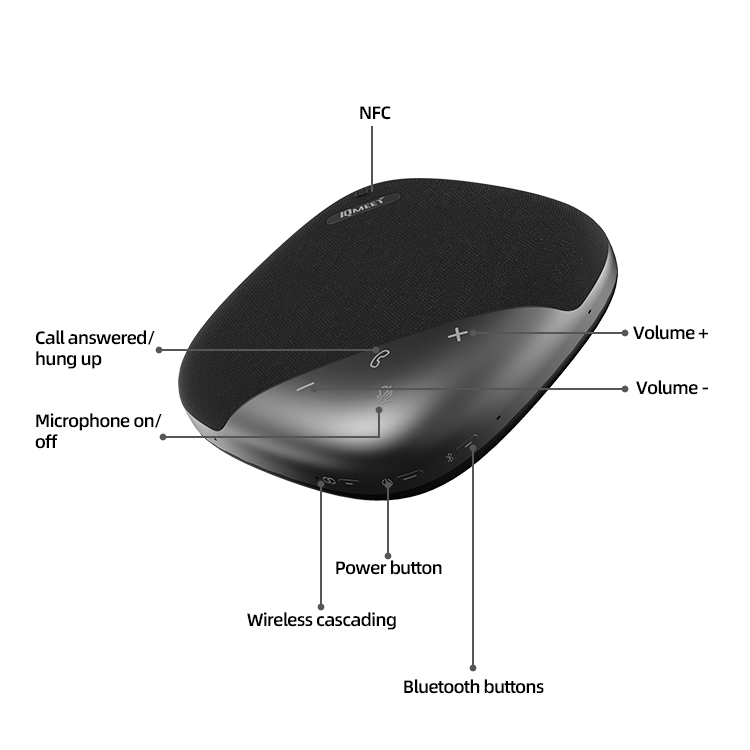
Home Theatre Omnidirectional USB Wireless Amplified Speakerphone Conference Powerful Sound Suitable for School and Conference
A practical pickup for huddle rooms, training rooms and hybrid classrooms where clear voice capture matters more than complex AV programming.
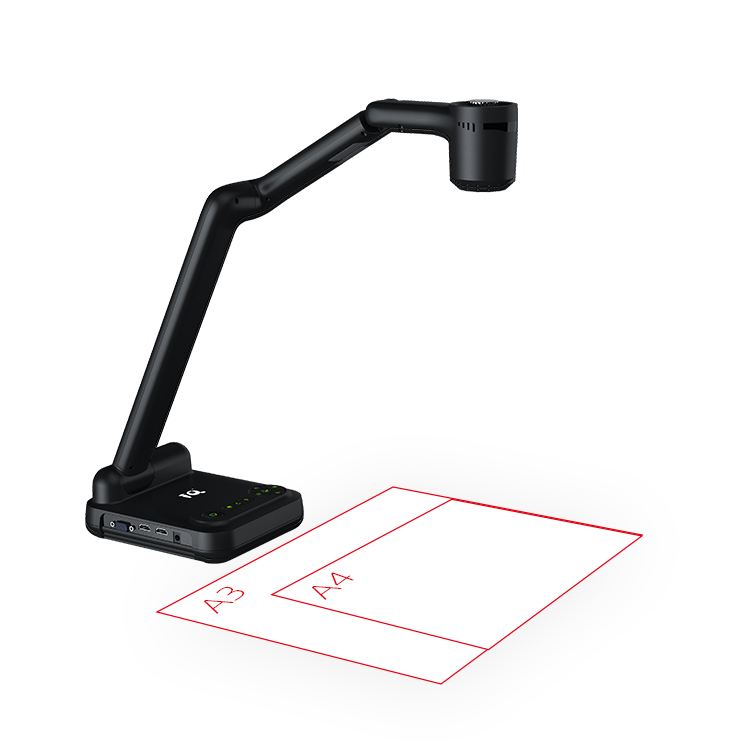
Portable Classroom Scanner Machine HD 8 Megapixel A4 Document Camera Scanner Visual Presenter with LED Fill-in Light
The most directly relevant model for buyers searching for digital scanner factories and wholesalers in Caloocan: a portable visual presenter for textbook pages, documents, objects and demonstrations.
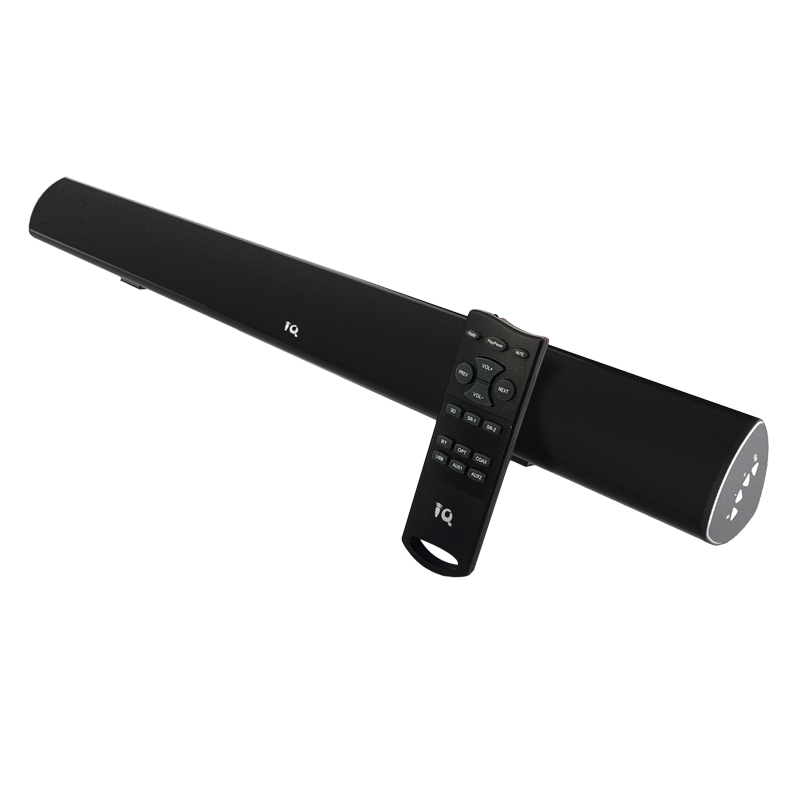
IQSoundbar Wholesale Office Conference Room Audio Sound Bar TV Soundbar with Subwoofer Active Speaker
Designed for meeting-room audio clarity and simple installation, with active speaker and subwoofer options for training rooms and boardrooms.
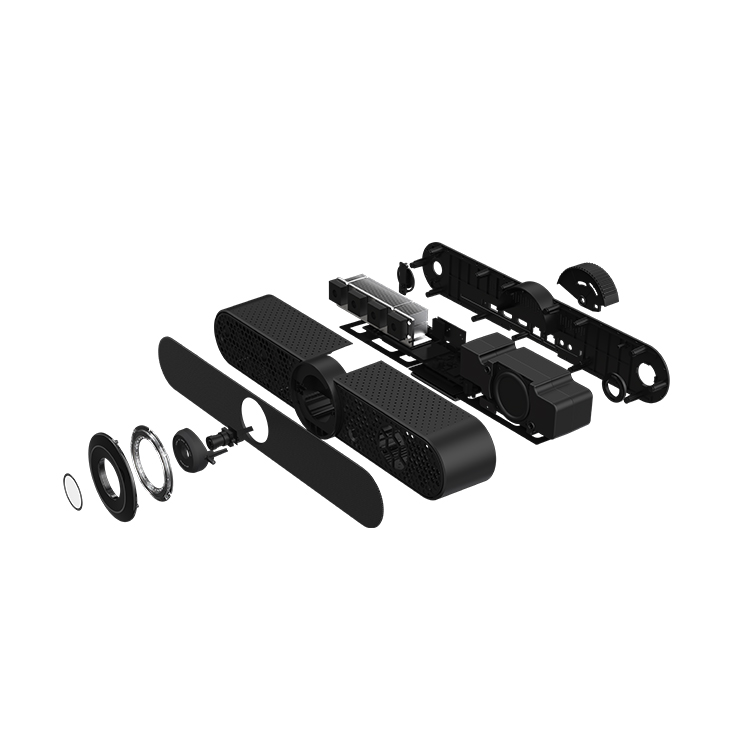
AI Auto-Tracking Webcam All-in-one 1080p 4k PC Mini Webcam for Video Calling and Conference
Useful for Caloocan BPO training rooms, university overflow classes and offices that need auto-tracking video without a dedicated camera operator.
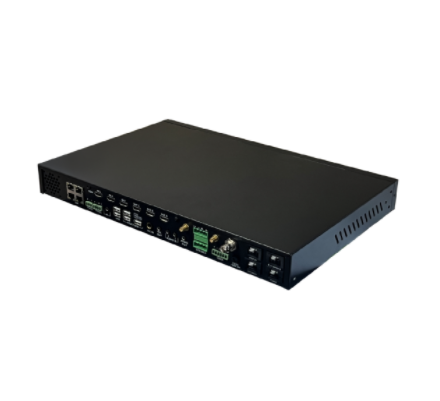
QNex Networked Media Processor for Digital Podium
A control-and-media backbone for lecture theatres, auditoriums and multi-room deployments where the podium must manage displays, audio and network functions.
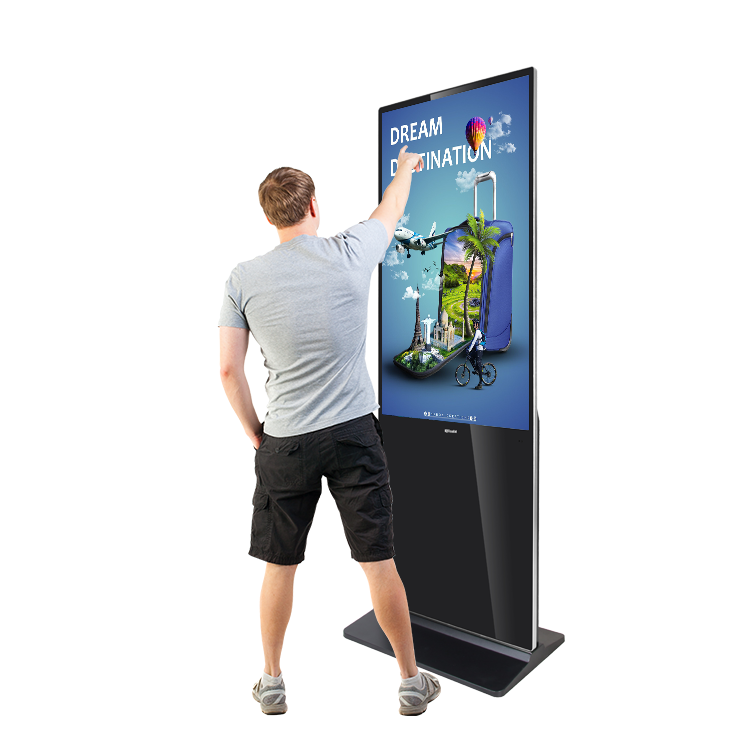
Wholesale 43inch Android Tablet Floor Standing Touch Kiosk for Hotel Bank School
An Android floor-standing kiosk for queueing, wayfinding, product catalogues, school information and bank or hotel self-service areas.
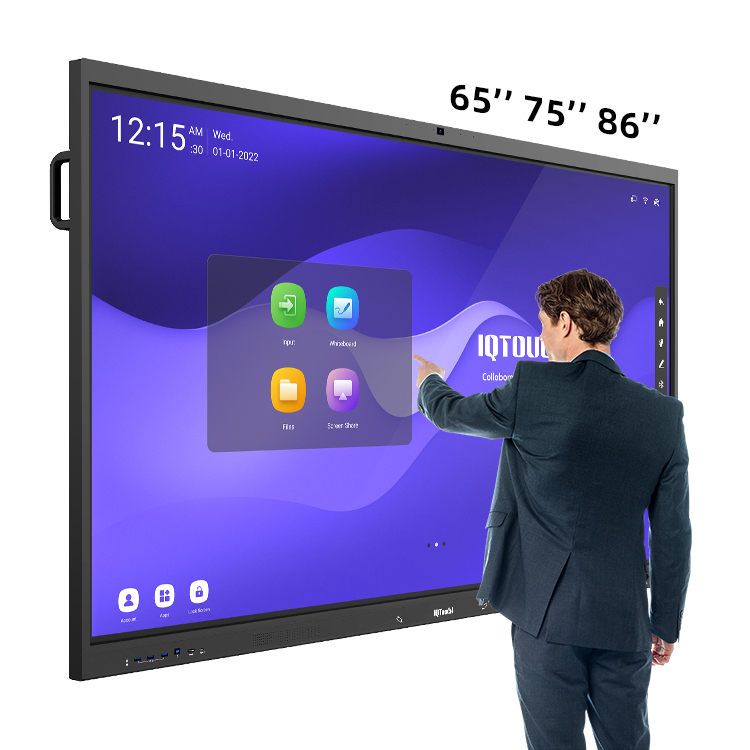
Dual System 4K 65 75 86 Inch Smart Board Interactive Electronic Whiteboard for Education and Conference
A core classroom and conference display for buyers replacing projectors with multi-touch 4K whiteboarding, annotation and screen sharing.
Why Caloocan Buyers Are Reassessing Digital Scanner Factories and Wholesalers
Caloocan is not only a residential market inside Metro Manila. It is also a procurement catchment for schools, review centres, barangay halls, city offices, clinics, retail operators, logistics teams and BPO training rooms. Buyers searching for digital scanner factories & wholesalers in Caloocan usually want three outcomes at the same time: local accountability, faster delivery and a price that still makes sense after freight, warranty and installation.
The first practical step is to separate “local availability” from “factory capability”. A Caloocan-based wholesaler may stock fast-moving items and offer same-week delivery, but stock access alone does not prove product traceability. A factory-direct supplier may offer OEM branding, engineering changes and lower unit cost at volume, but the buyer must verify production records, test reports and after-sales structure. The strongest sourcing decision is usually not “local or factory”; it is a verified factory plus a clearly documented local service plan.
In B2B procurement, “digital scanner” is a broad term. It can mean a portable 8MP A4 document camera for classroom demonstrations, a visual presenter for science and art lessons, a scanning station for IDs and forms, or a digital podium media processor that centralises display and audio control. For a Caloocan school, the useful question is not simply “how many megapixels?” but “which workflow must be captured, projected, recorded or shared?” The 8MP portable scanner in this lineup, for example, is useful where teachers need to show workbook pages, three-dimensional objects and handwritten corrections to a large class without passing materials around.
For offices, retail and government service counters, document imaging is tied to records, identity checks, enrolment, inventory and public information. The device must be easy to train, stable under frequent use, compatible with local power and software, and supported by spare parts. This is where a manufacturer with an in-house quality system provides information gain over a simple price list: buyers can ask for the exact test regime, production line, warranty terms and customisation options before committing.
Ruyden Interactive Technology Group Co., Ltd. supports this comparison as an SGS onsite-verified manufacturer with 19 years in the industry, 82 verified staff, a 5.0/5 verified buyer rating, design-based OEM/ODM capability and more than 10 years of export experience. For Caloocan projects, confirm the final delivery, installation and warranty scope with the manufacturer or local integrator, then compare that written scope against any local wholesale quote.
- Ask whether the supplier can show the factory audit, production line and product test reports, not only a product photo.
- Confirm 220V/60Hz compatibility, English user interface, HDMI/USB connectivity and local network conditions.
- Request spare-parts, warranty and escalation terms in writing before issuing a purchase order.
What a Caloocan buyer can verify before the first order
Transparent manufacturer data reduces sourcing risk and gives procurement teams a defensible basis for shortlisting.
Years in the interactive display and education AV industry.
Verified B2B trading membership and public trade records.
Verified staff across engineering, production, QC and export service.
Average buyer rating from verified transactions and reviews.
How to Compare Digital Scanner Factories and Wholesalers in Caloocan
A serious B2B comparison should move beyond unit price. Use these six checks to separate a reliable factory partner from a trading page with no production accountability.
Verification before negotiation
Ask for the SGS assessment, business licence, product test reports and public trade records. A Caloocan wholesaler should be willing to disclose the factory behind the product, not just the local sales office.
Real production capability
Look for in-house SMT, PCB, assembly and testing where possible. A manufacturer that controls these steps can protect custom designs, keep colour and firmware consistent, and respond faster to engineering changes.
Local power and language fit
For Caloocan buildings, confirm 220V/60Hz compatibility, plug type, English interface, HDMI/USB ports and stable Wi-Fi behaviour. These details prevent installation delays after the unit arrives.
Test reports and warranty logic
Ask how the scanner or display was tested: high and low temperature, drop, simulated transport, salt spray, button life, insertion force, static, earth continuity and withstand voltage. A written warranty without a test regime is incomplete.
OEM / ODM depth
If you are a Caloocan reseller, school group or system integrator, ask about logo placement, boot screen, housing colour, packaging, pre-installed software, language settings and hardware configuration.
After-sales route for Caloocan
Map who receives the ticket, who ships the spare part, who performs installation and how response time is measured. For multi-site rollouts, a documented escalation path is more valuable than a vague “lifetime support” claim.
Where These Products Fit in Caloocan
Caloocan projects range from single-room upgrades to district-wide rollouts. Along EDSA, Rizal Avenue, Samson Road, A. Mabini, Quirino Highway and the NLEX Balintawak corridor, buyers often need practical systems that can be trained quickly and maintained locally.
K-12 classrooms and tutorial centres
A portable 8MP document camera plus a 65-inch or 75-inch smart board lets teachers show workbook pages, handwriting, science demonstrations and art techniques without crowding students around a desk.
Universities, review centres and lecture halls
Large rooms benefit from an 86-inch 4K interactive board, QNex media processor, AI auto-tracking webcam and lecture capture setup. The goal is consistent visibility, recording and simple podium control.
LGU offices, barangay halls and service desks
Use touch kiosks for queues, forms and public information, plus document cameras for ID verification, records and citizen assistance. Outdoor displays can support announcements in high-footfall locations.
BPO training rooms and corporate boardrooms
Omnidirectional speakerphones, IQSoundbar audio and AI tracking webcams make hybrid meetings easier to hear and see. These are especially relevant for multi-shift BPO and shared-service operations.
Retail, hotels and showrooms
Floor-standing Android kiosks and waterproof outdoor digital signage help retail strips, hotel lobbies and showrooms communicate promotions, directions and catalogues without reprinting static posters.
Clinics, logistics hubs and training centres
Clinics can capture documents and IDs; logistics teams can train staff on scanned forms and labels; training centres can combine a visual presenter with conference audio for certification sessions.
Localized Trends Shaping Demand in 2025 and Beyond
Procurement behaviour in Caloocan is changing because classrooms, public offices and private companies are all moving toward digital-first workflows, but each sector values a different type of proof.
Video-first classrooms and training rooms
Schools and BPOs are upgrading cameras, microphones and displays so remote participants can follow lessons and meetings without repeated technical support.
Faster document capture at service counters
Document cameras and scanners reduce manual handling of forms, IDs and records. The value is speed, traceability and less physical contact with sensitive documents.
Projectors giving way to interactive panels
Schools comparing projector bulbs, cabling and shadow problems are increasingly choosing all-in-one 4K touch displays with built-in whiteboarding and wireless sharing.
Outdoor and lobby digital signage
High-footfall areas around transport hubs, retail strips and civic offices need durable signage that can be updated centrally instead of reprinted every campaign.
Self-service kiosks in customer-facing spaces
Android floor-standing kiosks are being used for wayfinding, catalogues, queueing and promotions in banks, hotels, schools and showrooms.
Documentation quality becomes a decision factor
Private and public buyers are asking for clearer datasheets, test reports, warranty terms and after-sales responsibilities before approving a supplier.
Recommended Caloocan Configurations by Environment
Use this matrix as a starting point, then confirm room dimensions, viewing distance, power, network and installation access with the project team.
| Caloocan environment | Recommended configuration | Why it fits |
|---|---|---|
| K-12 classroom / tutorial centre | Portable 8MP A4 document camera + 65-inch or 75-inch 4K smart board | Teachers can display workbook pages and objects while students see annotations clearly from the back of the room. |
| University lecture hall | 86-inch dual-system 4K smart board + QNex media processor + AI auto-tracking webcam | Combines large-format visibility, podium control, recording readiness and hands-free presenter tracking. |
| Corporate boardroom / BPO training room | IQSoundbar + omnidirectional conference speakerphone + AI tracking webcam | Improves voice pickup, room audio and hybrid meeting video without a complex AV rack. |
| Barangay hall / LGU service lobby | 43-inch Android floor-standing touch kiosk + outdoor waterproof digital signage | Supports queueing, announcements, forms and public information in high-traffic service areas. |
| Retail showroom / hotel lobby | 43-inch touch kiosk + outdoor waterproof signage + 43-inch floor-standing advertising kiosk | Combines self-service browsing with eye-catching promotions and weather-resistant exterior messaging. |
| Training centre / auditorium | 4K interactive smart board + conference speakerphone + QNex digital podium processor | Creates a presentation, audio and control workflow that is easier to operate for recurring events. |
Need a room-by-room recommendation? Share the floor plan, seat count, target budget and whether the project is for a school, LGU, reseller or enterprise.
How to Vet a Digital Scanner Factory or Wholesaler in Caloocan
Use this checklist in the first supplier meeting. A credible factory or wholesale partner should answer these points with documents, not verbal assurances.
Why Ruyden Is a Credible Factory Partner for Caloocan Projects
For buyers comparing digital scanner factories and wholesalers in Caloocan, the strongest supplier is the one whose claims can be checked. These advantages are based on public records and in-house manufacturing assets.
SGS onsite-verified manufacturer
Ruyden has been onsite-verified by SGS Group. Supplier assessment, credit overview, trade capacity and transaction history are publicly viewable, which supports tender reviews and distributor onboarding.
19 years of industry experience
The company combines 19 years in the industry with 21 years of verified B2B trading, 82 verified staff and a 5.0/5 buyer rating. This track record matters when a Caloocan buyer needs continuity, not a one-off transaction.
Verified design-based customization
OEM and ODM customization can cover logo, boot screen, housing colour, packaging, software pre-installation, language and hardware configuration. This helps resellers build a local brand instead of competing only on price.
In-house SMT, PCB and assembly
Production is supported by SMT, automatic insertion, PCB and assembly lines. For buyers, this means tighter control over consistency, custom hardware changes and production scheduling.
Reliability test lab
Testing includes high and low temperature, drop, simulated transportation, salt spray, button life, insertion force, static, earth continuity and withstand voltage. These tests are relevant to Philippine heat, humidity, transport and daily classroom use.
Complete smart classroom ecosystem
Interactive flat panels from 55 to 100 inches, interactive whiteboards, lecture capture, digital podiums, 4K wireless presentation and AV integration can be specified together. That reduces compatibility risk for school and campus rollouts.
Verify Ruyden independently
Use public records to support distributor onboarding, tender checks and internal supplier approval.
From Caloocan Requirement to Factory Delivery in Six Steps
A structured process gives resellers, integrators and procurement teams a clear audit trail from first inquiry to final installation.
Requirement review
Share room types, seat count, quantities, budget, target market and certification needs.
Solution design
Engineers propose display size, scanner setup, audio, control and software configuration.
Sample approval
Pre-production samples confirm look, feel, interface, packaging and performance.
Mass production
In-house SMT, PCB and assembly lines build the approved configuration.
QC and testing
Reliability tests and final inspection are completed before export packing.
Delivery and support
Export documents, shipping coordination, installation guidance and after-sales support are confirmed.
Questions Buyers Ask About Digital Scanner Factories & Wholesalers in Caloocan
These answers focus on practical sourcing, verification and deployment. For project-specific terms, request a written quotation from the supplier or local integrator.
Are there digital scanner factories and wholesalers in Caloocan that serve schools, LGUs and resellers?
Caloocan has local IT and AV wholesalers, systems integrators and Manila-based distributors that can supply document cameras and smart classroom equipment. At the same time, many competitive projects are sourced directly from verified manufacturers and supported by local partners. The practical approach is to compare both routes using the same written specification, warranty and service requirements.
What should I verify before ordering from a Caloocan wholesaler or overseas factory?
Verify the legal entity, factory audit, production capability, product test reports and public trade records. Ask for the exact model, serial-number policy, warranty terms, spare-parts availability and who will handle installation or replacement in Caloocan. If the supplier cannot explain the after-sales route clearly, the lowest price may not be the lowest total cost.
Can Ruyden support Caloocan schools, LGUs and resellers with OEM or ODM customization?
Yes. Ruyden supports design-based customization including logo, boot screen, housing colour, packaging, software pre-installation, language settings and hardware configuration. For Caloocan projects, confirm the final customization scope, sample approval process and documentation requirements before production begins.
What is the typical MOQ and lead time for digital scanner or AV products?
MOQ and lead time depend on the model, customization level, accessory set and current production schedule. Standard configurations may support smaller trial orders, while custom logo, packaging or software work usually requires a higher quantity. Ask for a written production schedule that separates sample approval, mass production, QC and shipping.
Do you provide delivery, installation and after-sales support in Caloocan?
Ruyden is a manufacturer based in Fuzhou, China. Caloocan projects are typically supported through export shipping and local project integrators. The quotation should state the exact delivery point, installation scope, training, warranty period, spare-parts terms and response-time expectation so responsibilities are clear before the order is placed.
Which product should a small classroom or barangay office start with?
For a small classroom, start with a portable 8MP A4 document camera and a 65-inch or 75-inch interactive display. For a barangay office or service counter, a 43-inch Android floor-standing touch kiosk may be more useful for queueing, announcements and self-service information. Match the first purchase to the daily workflow rather than buying the largest screen available.
What documents can support DepEd, LGU or private bidding requirements?
Commonly requested documents include company registration, product datasheets, test reports, warranty statements, authorization letters where applicable, trade records and after-sales commitments. For public sector projects, confirm the exact checklist with the bid documents and ask the supplier to provide only accurate documents that match the offered model.
What warranty and spare-parts information should be written into the quotation?
The quotation should state the warranty period, what is covered, what is excluded, the replacement process, spare-parts availability, technical support channel and response-time expectation. For multi-unit deployments, include a recommended spare-parts kit and a clear escalation contact for Caloocan installation teams.
Need a verified factory quote for a school, office, LGU or reseller order?
Send your room types, quantities, target budget, preferred screen sizes, installation requirements and any bidding documentation. The team can respond with a practical configuration, product specification and export-ready quotation path.
